


How AI Agents for HR Improve Workflows
HR departments manage recruiting, employee support, payroll processing, and compliance work every day. As your company grows, those tasks pile up quickly, especially when you rely on manual handoffs and emails.
The volume of tasks and the pressure they create explain the growing need for AI agents for human resources in daily operations.
These agents understand employee requests, operate within HR systems, and complete tasks with minimal human input. HR workflow automation allows those actions to run in sequence without interruptions.
In this article, you’ll learn how AI agents in HR function through real examples tied to everyday tasks.
Turn daily HR tasks into automated workflows that actually run. Try Activepieces now!
TL;DR
- AI agents for HR handle hiring, onboarding, payroll checks, and employee support inside existing systems.
- HR teams use agents to automate repetitive tasks while keeping decisions and approvals human-led.
- AI agents connect directly to HR tools, so data flows without manual updates.
- Activepieces lets you build and control these agents with workflows and data integrations.
Why HR Teams Are Turning to AI Agents
Here are the key benefits HR teams get when they start working with AI agents:
- AI agents for HR work like extra teammates that can plan steps and finish complex tasks without waiting for constant human intervention.
- Recruiting changes fast when one system automates the entire HR workflow, from screening resumes and generating job descriptions to scheduling interviews and collecting feedback.
- Agents can handle repetitive administrative tasks like updating employee records, which removes hours of manual data entry every week.
- Capabilities like natural language processing (NLP) make sure that changes in employee satisfaction are detected when analyzing written feedback.
- Insights from agents can support decision-making by providing HR professionals with up-to-date information on workforce planning trends, skill gaps, and retention risk.
- Employees get faster answers about company policies and employment contracts, which helps your people understand terms.
- Time saved on routine work gives your HR teams space to focus on strategic initiatives that improve employee engagement and experience from hiring through retention.
Real-World Examples of AI Agents for HR
AI agents can handle different routine HR tasks and free up your managers’ time for more important business. Here are some common examples.
1. Recruiting and Talent Acquisition
HR teams turn to agents to streamline recruiting and talent management while keeping final decisions in human hands.
AI Candidate Screening and Matching
Resume screening used to mean opening files one by one and selecting those who fit in. HR AI agents now handle that early-stage process by parsing resumes and analyzing candidates’ skills.
Once applications enter the system, the agent compares each profile against role needs and past hiring results. Every candidate receives a fit score. Hiring managers see a ranked list rather than hundreds of resumes.
Early bias checks remove names and background details so decisions stay focused on qualifications. Candidates also answer screening questions through chat, and strong responses move forward without delays.
How Activepieces Supports Candidate Screening

Activepieces connects HR systems into a flow. For instance, a bot can join interviews, transcribe conversations, send transcripts to a GenAI tool, and automatically save summaries.
Then, the CV screening workflow scores resumes based on the job description and sorts candidates into qualified and unqualified folders, which saves hours of manual review.
Follow these steps to set it up:
- Create a form to collect the candidate’s name, email, previous job title, and CV upload.
- Add an action that extracts all text from the uploaded CV file.
- Send the extracted text to an AI model (Claude) and ask it to summarize the CV into three key points.
- Send the CV text along with the job description to another AI model (LLaMA) and ask it to compare them and return a score from 1 to 10.
- Store the results in Google Sheets:
- Candidate details
- CV summary
- CV score
- Add a conditional branch based on the score.
- If the score is seven or higher, save the CV to a Google Drive folder for qualified candidates.
- If the score is below seven, save the CV to a folder for unqualified candidates.
- Submit a test entry through the form and confirm that the data appears in Google Sheets and the CV is routed to the correct folder.
AI Interview Scheduling
Interview scheduling often slows down hiring more than screening. AI agents manage that step without back-and-forth emails. When a candidate reaches the interview stage, the agent checks availability for HR managers and interview panels right away.
Candidates suggest times through email or chat. The agent adjusts when conflicts appear and updates calendars instantly.
Multi-round interviews stay organized, even when recruiting involves complex tasks at scale. HR teams spend less time coordinating schedules and more time choosing the right people.
2. Onboarding
Many onboarding problems arise because things arrive out of order, or no one explains what to do next. AI agents make sure steps happen in the right order, and nothing gets skipped.
New Hire Paperwork and Compliance
Every jurisdiction, job type, and contract has different legal rules. Without an AI agent, you need to rely on checklists or your memory.
Once someone signs an offer, the agent immediately looks at three things: Where the person lives? What job were they hired for? What type of contract did they sign?
Based on that, it automatically selects the correct tax and legal forms. A hire in the US receives different documents than a hire in the EU, and the system handles the double-check of the laws.
Form filling also changes. Rather than typing the same information repeatedly, the new hire uploads a single ID. The agent pulls the needed details and fills payroll, tax, and banking forms on its own.
Long policy documents turn into short questionnaires so people actually understand what they agree to.
Onboarding Support Chat Agent
Waiting for email replies makes people feel stuck and frustrated. A chat agent removes the waiting.
From the first day, the agent is available at all times. Someone can ask a question late at night or on the weekend and still get an answer. The agent knows who’s asking.
Role, location, and department info shape every response, so answers make sense. A sales rep gets a different answer from a marketing analyst.
The agent can also help reset access, guide benefit choices, and remind someone about unfinished steps. When employees sound confused or stressed, the system alerts HR to check in.
Through agents, you can provide steady HR support even if you’re not online all day, which creates an enhanced employee experience right from the start.
How Activepieces Supports Onboarding
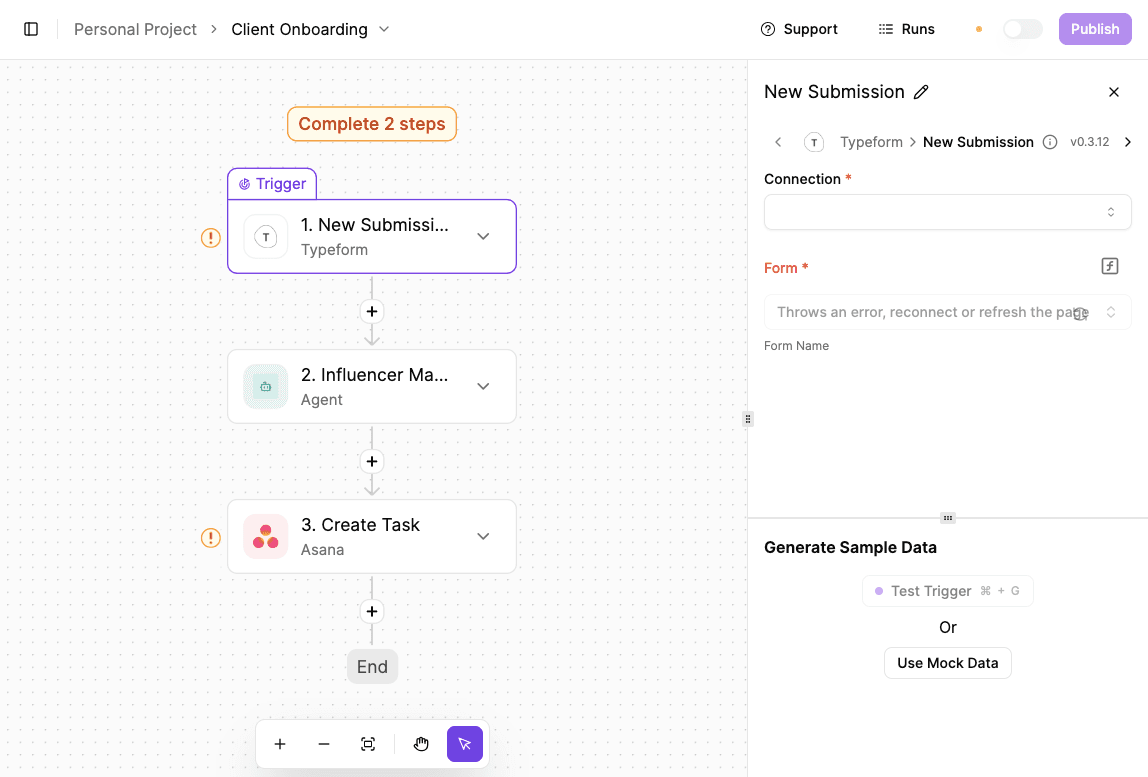
You can use the client onboarding workflow and tweak it to be an automated onboarding workflow for employees.
- Click “New Flow” to start a new workflow.
- Select Jotform as the trigger and choose “New Submission” so the flow runs when an onboarding form is completed.
- Connect the Jotform account and select the form used to collect onboarding details.
- For employees, include role and start date.
- For clients, it could include business information.
- Test the trigger by submitting a sample form response and confirm the data is captured.
- Add a Gmail action to send a welcome email. Connect the email account, write a message that outlines the next steps, and test the action to make sure the email sends correctly.
- Add an action to save the new record in a CRM or HR system such as Pipedrive or HubSpot. Map the form fields to the correct properties and run a test to confirm the record is created.
- Create onboarding tasks by adding a project management action using a tool like ClickUp. Define the task details and test to verify that the task appears.
- Notify the team by adding a Slack message action that posts onboarding and task details to a channel.
- Test the full flow, then publish it to activate the automation.
3. Employee Support
Employees ask questions all the time. AI agents help support employees by handling these inquiries right away, so no one feels ignored. You don’t need to spend your entire day answering emails, and employees don’t need to wait days for simple answers.
Time Off and Leave Management Agent
When employees request vacation days, sick leave, or medical leave, each request follows different company policies and legal rules. AI agents can now manage that entire flow.
Let’s say an employee sends a message saying they need to be off next Friday. The agent reads that message and understands the request right away. It checks the available leave balance, confirms the request follows company rules, and looks at legal requirements when medical leave comes in.
Besides that, it checks team calendars to avoid conflicts. When too many people have already taken that day off, it suggests another option instead of rejecting the request outright.
Once everything checks out, the agent submits the request for the line manager’s approval, updates calendars, and notifies payroll to keep pay accurate.
HR Helpdesk Ticket Automation
HR inboxes fill up quickly with questions about pay, benefits, access, and records. AI agents now act as the first point of contact and often the final one, too. These agents use large language models (LLMs) to understand the intent and access secure employee data.
For instance, as someone messages, the agent reads it, figures out what the person needs, and checks their profile for context. When issues turn sensitive, the agent summarizes everything and routes it to the right person.
Systems automate the creation and management of support tickets for HR inquiries, log actions for tracking, and close tickets once resolved.
How Activepieces Supports Ticket Automation
Set up an automated helpdesk workflow that records Zendesk tickets into a MySQL database. To start:
- Create an Activepieces account, then copy the “Zendesk + MySQL” template into your workspace.
- Open the flow and look at the first step, which is the Zendesk trigger. Select “New ticket in view” so the automation runs whenever a new support ticket appears.
- Connect your Zendesk account by creating a new connection and completing the authorization steps.
- Move to the MySQL step labeled “Insert Row.”
- Create a new connection to your MySQL database by entering:
- Host
- Database name
- Username
- Password
- Choose the table where tickets should be stored, then map Zendesk ticket fields such as ticket ID, subject, status, requester email, and created date to the matching columns in your database.
- Save the step and run a test by creating a test ticket in Zendesk. Confirm that a new row appears in MySQL with the correct data.
- Once the test succeeds, publish the flow. From that point on, every new Zendesk ticket will be automatically recorded in your MySQL database.
4. Performance Management and Retention
Performance and retention problems usually build up slowly, which makes them hard to catch early without help.
Performance Monitoring and Feedback AI
Performance monitoring and feedback AI sit within platforms you use for work, such as chat apps and project boards. It includes an agentic AI system that continuously analyzes work patterns, communication, and project outcomes.
When someone finishes a project or handles a tough situation, the system can share real-time feedback right away. You can even use the same signals to track the efficiency of the HR function.
Training improves, too, since the system can also gather employee feedback on specific training modules and show what actually helps people grow.
How Activepieces Supports Performance Monitoring and Feedback
You can use Activepieces to build an internal employee feedback system that uses AI to keep responses professional, alert HR when something needs attention, and give leadership a clear weekly pulse.
The setup uses two flows: One handles real-time feedback, and the other summarizes and resets everything on a schedule.
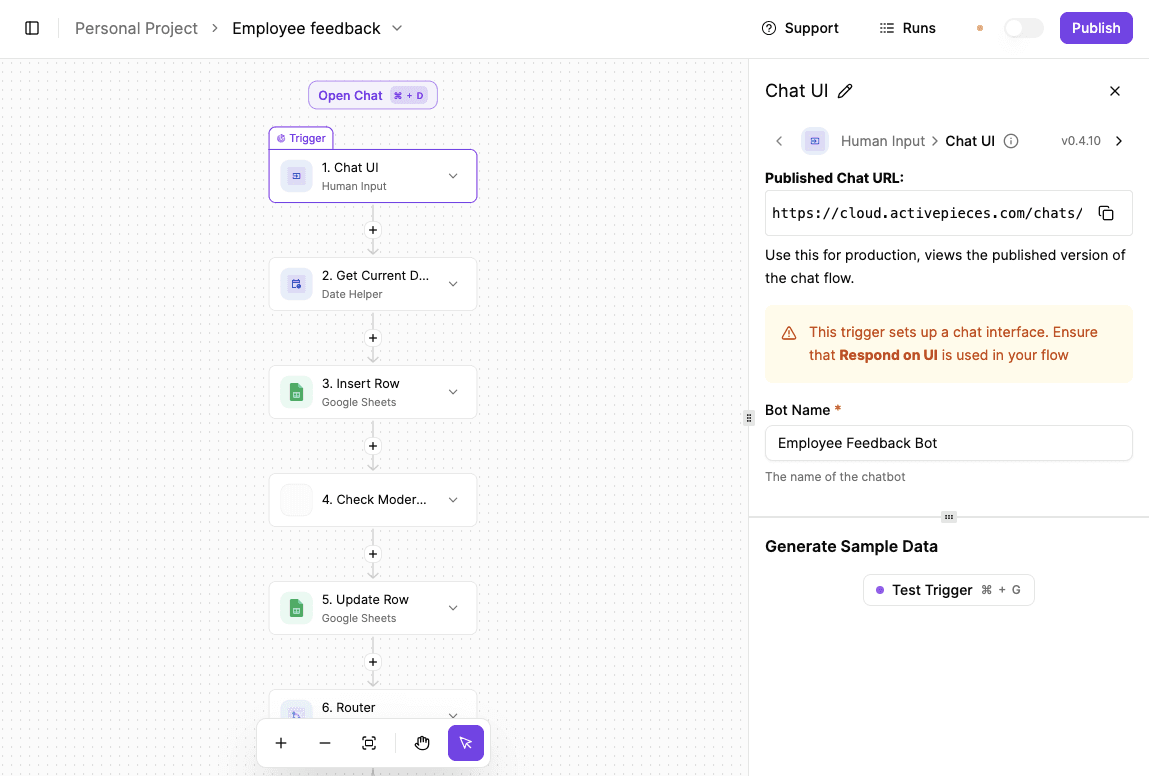
To capture and moderate employee feedback, take the following steps:
- Create a new flow in Activepieces and select the “Chat UI trigger,” which lets your employees submit feedback directly through a chat interface.
- Add a “Date Helper” step to capture the exact date and time each message is submitted so every entry is automatically timestamped.
- Store the feedback in Google Sheets by adding a “Create Row” action. Save the feedback text along with the submission date and time, so each message becomes a new row in the sheet.
- Send the feedback text to “Utility AI” for moderation. Configure it to detect:
- Harassment
- Hate speech
- Self-harm
- Other unsafe content
- Use the AI response to determine whether the feedback should be flagged.
- Add a “Router” to handle the outcome. If the feedback is flagged, send an email notification to HR or a manager with the full details.
- Then send a response back through the Chat UI, thanking the employee and encouraging respectful, professional feedback.
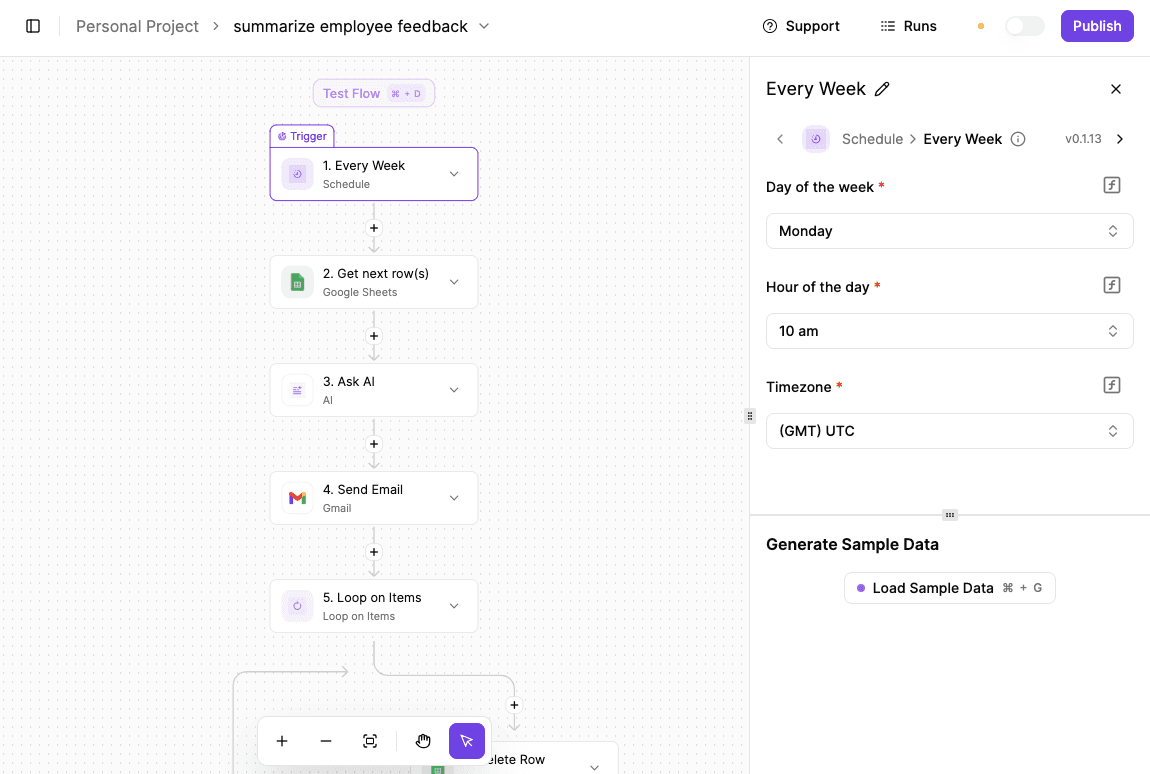
Weekly feedback summary and cleanup works as follows:
- Create a second flow and use a “Scheduled trigger” set to run weekly, such as every Monday morning.
- Retrieve all feedback from the same Google Sheet for the past week. Send that data to Ask AI and prompt it to summarize and group insights clearly.
- Email the AI-generated summary to HR or managers. Loop through the processed rows and delete them from Google Sheets so the system is ready for the next week.
Retention Risk Prediction Agent
Your employees never quit suddenly, even though it looks that way from the outside. Long before someone hands in their resignation, small changes start to show up in how they work and communicate.
Yes, you can notice changes in one person, but no human can track patterns across hundreds or thousands of employees at once.
With AI agents, you can watch non-private signals, like work hours increasing week after week, fewer messages in team channels, or a shift in how someone responds during meetings.
It also looks at context. For example, a manager left recently, someone was passed over for the promotion, or pay no longer matches market rates for that job.
The agent combines those signals and assigns a risk score. That score doesn’t mean someone will quit tomorrow. It means the situation needs attention.
HR leaders get early notice and suggestions, such as scheduling a one-on-one, adjusting workload, or discussing growth options.
5. Operations and Compliance
AI agents step in as quiet monitors that check details in your HR operations continuously, so issues get fixed long before they affect your employees or trigger audits.
Compliance and Audit Preparation AI
HR departments do compliance work, and an AI agent makes it easier as it connects to systems, payroll software, and document storage and review records as soon as changes happen.
When laws change, the agent adjusts its rules and scans job postings, pay data, and records to spot issues before complaints start. Time tracking numbers get compared with payroll and leave balances, so mismatches don’t slip through.
Unusual activity, including duplicate records or strange pay changes, triggers alerts before damage spreads. Routine tasks stop draining time, and audits turn into quick report requests.
Payroll and Benefits Processing Assistant
Pay and benefits cause more stress than almost anything else in HR. AI agents now manage payroll and benefits together, keeping data consistent.
These agents move information between systems, check for errors, and fix problems early. It also uses reasoning to identify errors, handle complex tax logic, and answer employee queries without HR staff having to dig through spreadsheets.
Every night, records get compared. Benefit changes flow into payroll automatically. Over time, mistakes show up before pay runs. Employees ask questions and get clear answers about coverage or pay changes.
The system can also provide guidance on compensation for new hires and existing employees. Payroll processing runs cleaner, allowing HR teams to focus on work that needs judgment.
Automate Your HR Workflow With Activepieces
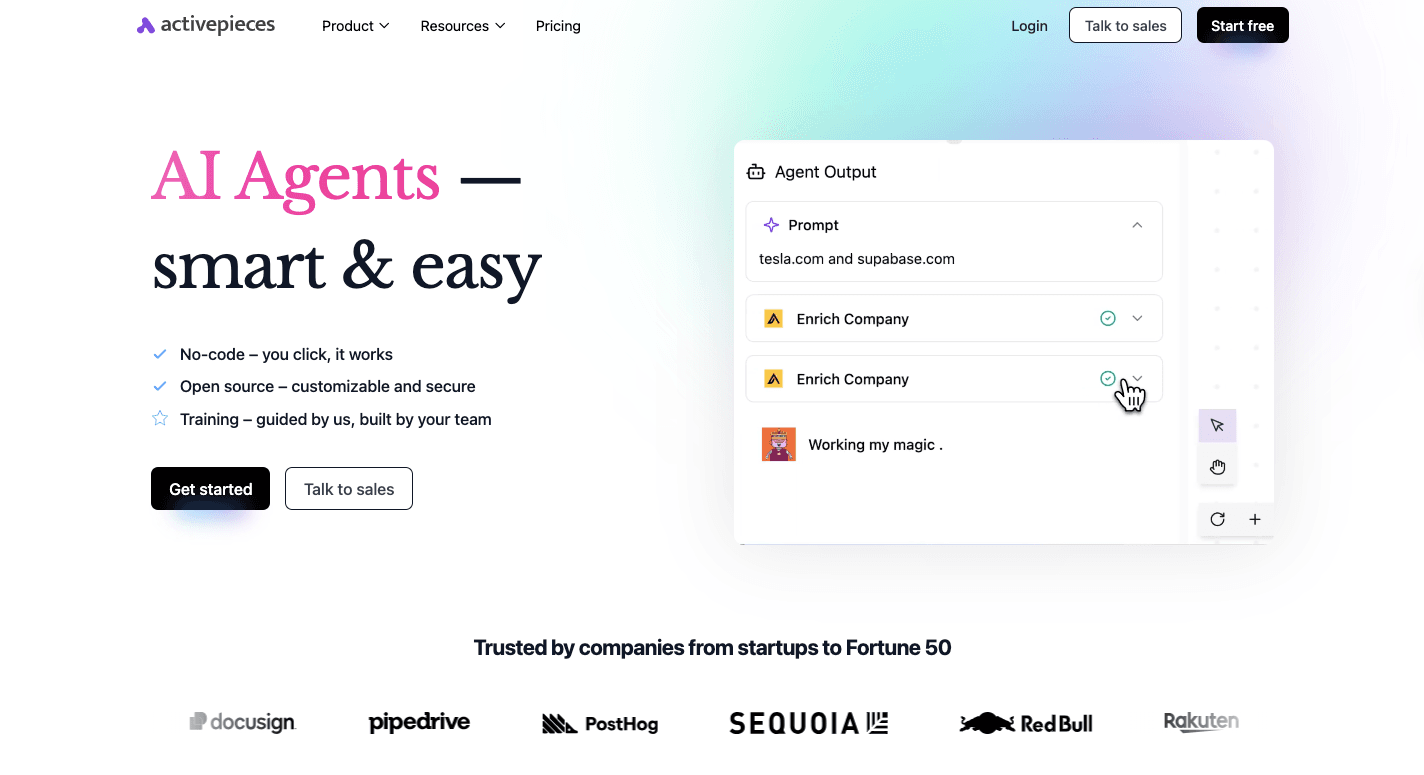
Activepieces is a workflow automation platform that integrates different platforms and connects them through rules and logic that AI agents can follow.
It works as an AI platform where you design workflows. Every step stays visible. You can see when an HR agent pulls data, sends a message, or waits for approval. You can also decide which AI tools run automatically and where human checks should happen.
Activepieces supports human-in-the-loop steps, so flows pause until someone approves them. Chat and form interfaces let you interact with agents directly.
Native AI capabilities, on the other hand, support different models, so you can experiment without rebuilding flows. Self-hosting options protect sensitive data, which matters for enterprise HR. Developers can extend logic using TypeScript, while non-technical users build flows visually.
Integrating Activepieces With Your HR Tech Stack
Let’s walk through how integration actually works, step by step:
- Open the Activepieces dashboard.
- Click “New Flow” and choose what starts the process, such as a form submission or an update in your hiring system.
- Connect your tools. For example, you can link Lever for recruiting and Slack for notifications by selecting them from the connector list.
- Define what happens next: A candidate moves stages, a message gets posted, or a task gets created automatically.
- Once the flow looks right, test it to see real data move through the steps.
- Publish the flow, and it runs on its own.
Nothing replaces your current systems. Everything connects cleanly, and HR workflows stay easy to follow.
As of now, you can connect with 559 pre-built pieces. Some of the HR systems you can integrate with include:
Link tools like BambooHR, Lever, and Slack with one flow you control. Explore Activepieces today!
FAQs About AI Agents for HR
What is an AI agent in HR?
An AI agent is a software solution that can understand requests, make decisions, and complete actions across HR processes without waiting for constant input.
It goes beyond answering questions and actually performs work, like automating repetitive hr tasks, updating records, or triggering approvals.
How are AI agents different from HR chatbots?
Chatbots mostly reply with stored answers. An agent, in contrast, understands context, checks data, and completes tasks end to end. That means context-aware responses, follow-up steps, and the ability to adapt based on user feedback.
Can AI agents integrate with existing HR systems?
Yes. AI agents integrate directly with existing HR systems like ATS, payroll, and HRIS tools. They connect data across platforms, so workflows run smoothly.
Are AI agents for HR secure and compliant?
Security and compliance depend on setup, but HR platforms support access controls, approvals, and audit logs. AI agents follow company rules, respect permissions, and help engage employees while staying aligned with legal and data requirements.